 DailyWall
The productivity tips that work best are simple: decide your top three tasks the evening before, do the most important one first in a protected focus block, batch small tasks together, keep your phone out of reach while you work, and protect your sleep. Try two or three tips for a week rather than all of them at once.
Most productivity tips fail for a boring reason: you read twenty of them, try all of them on Monday, and by Thursday you’re back to your old routine. The tips weren’t wrong; there were just too many at once. This list collects 30 productivity tips that hold up in real life, at a desk job, working from home or studying, and groups them by the problem they solve: planning, focus, energy, phone distractions and habits. Read the group that matches your biggest problem, pick two or three tips, and use the one-week plan at the end to find out which ones work for you.
Planning tips: decide before the day decides for you
Most lost time isn’t lost to laziness. It’s lost in the gaps, the minutes spent deciding what to do next, or doing whatever shouted loudest. These planning tips move those decisions to a calmer moment.
Tick the steps as you go
Focus tips: do one thing at a time, for long enough
Focus is less about willpower and more about removing the reasons to stop. Switching between tasks has a cost: researchers call the leftover thoughts about the previous task “attention residue”, and it makes the next task harder to sink into. These tips are about fewer switches and longer runs.
Tick the steps as you go
Energy tips: manage your energy, not just your time
Two hours when you’re fresh are worth more than four when you’re exhausted. Productivity is partly a question of matching the right work to the right state of mind and body.
Tick the steps as you go
Phone and distraction tips: make the easy thing the right thing
Your phone is designed to be picked up. Willpower alone rarely beats that, so the most effective tips change your environment instead. One well-known study even suggested that having a smartphone on the desk can reduce available attention, though later replications have been mixed. Either way, out of sight is easier than resisting.
Tick the steps as you go
Habit tips: make productivity automatic
The most productive people aren’t making heroic decisions all day. They’ve turned the important things into routines that run without much thought. These five tips help a new routine stick.
Tick the steps as you go
Keep today’s priorities on your Lock Screen with DailyWall
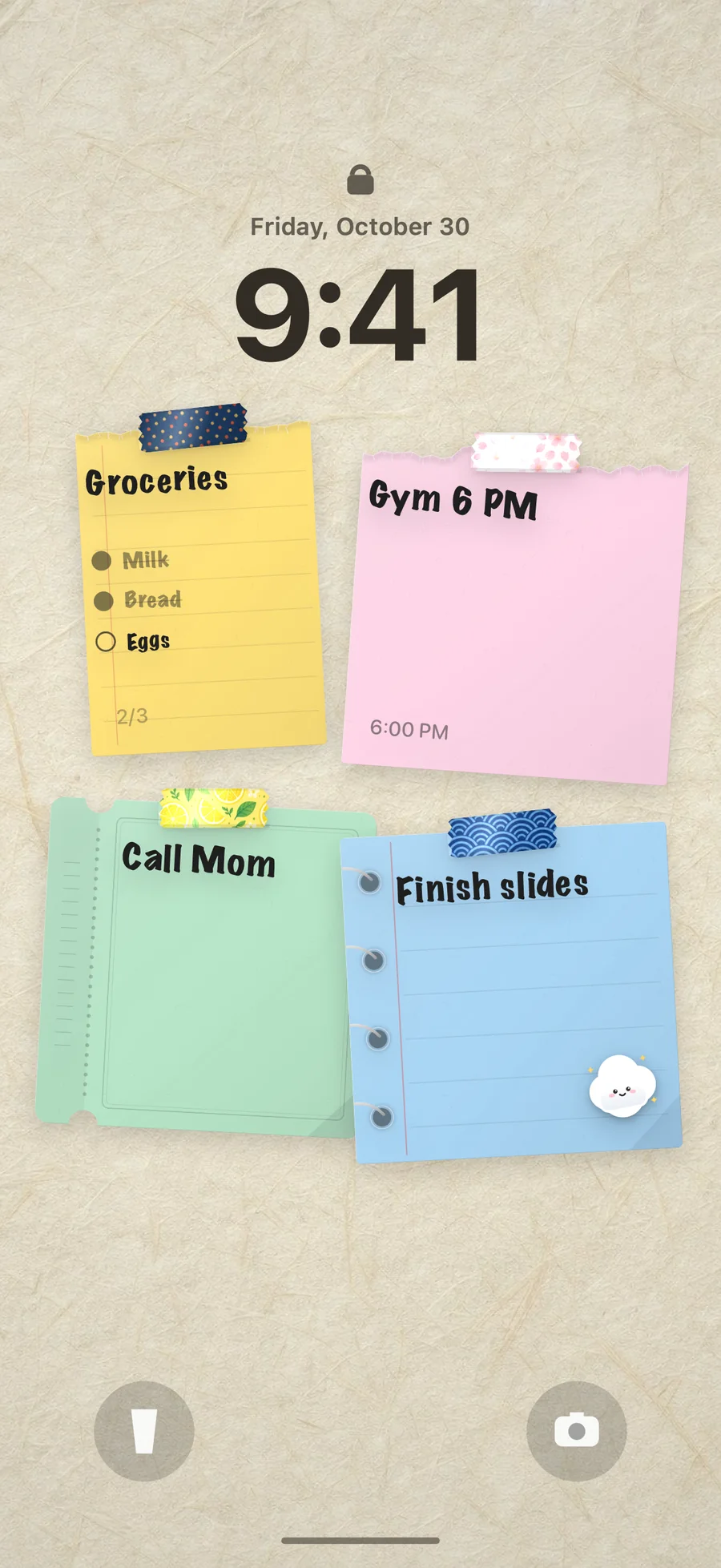
Tips 2 and 23 work best together: three priorities, placed where you’ll see them dozens of times a day. Most of us pick up our phones far more often than we open a to-do app, so the Lock Screen is the most-seen piece of paper we own.
DailyWall is an iPhone and iPad app built around that idea. Every day has its own wall of paper notes, and that wall becomes your Lock Screen wallpaper. You write today’s priorities on a note, tick them off as you go, and a Shortcuts automation you set up once keeps the Lock Screen updated. Nothing is saved to your Photos library. You can add a time and a reminder to a note, repeat notes on the days you choose, and turn routines like focus blocks or a screen-free hour into habit papers that hang themselves on your wall each day.
Tick the steps as you go
Productivity tips for work and for working from home
At the office, the biggest threats are meetings and interruptions. Block your best hours in your calendar as if they were meetings with yourself, batch questions for colleagues into one conversation instead of five, and end each meeting by writing the next action and who owns it. A meeting without a next action usually needs a second meeting.
Working from home has the opposite problem: no edges. Start and finish at fixed times, get dressed for work, and if you can, work in one spot that you leave at the end of the day. A short walk before starting can replace the commute as a mental switch into work mode, and another one at the end switches you back out. Household chores are the remote worker’s favourite way to procrastinate; give them their own slot instead of letting them leak into focus time.
If you study rather than work, the same tips apply with one change: plan your sessions around topics rather than hours. Our study planner Lock Screen post shows layouts for exam season.
Why most productivity tips don’t stick
Productivity advice often fails for predictable reasons, and knowing them helps you choose better tips.
Too many changes at once. Every new routine needs attention until it becomes automatic. Ten new rules on Monday means none of them gets that attention.
The tip solves someone else’s problem. If your real issue is that you’re exhausted, a fancier task manager won’t help. If you’re distracted, waking up earlier just gives you more distracted hours. Diagnose first: is it planning, focus, energy, distraction or consistency?
The system becomes the work. Colour-coding, tagging and reorganising your list can feel productive while nothing important moves. If maintaining your system takes more than a few minutes a day, simplify it.
The reminder disappears. Good intentions live in apps you forget to open. The tips that last tend to be the ones you see without trying: a note on the fridge, a list on the desk, priorities on the Lock Screen.
A one-week plan to test these productivity tips
Treat this list like an experiment. Here’s a simple week that tests the tips with the biggest payoff for most people:
Tick the steps as you go
Questions people ask
What are the most effective productivity tips?
For most people: choose three priorities the evening before, do the most important task first in a protected focus block, batch small tasks, keep the phone out of reach while working, and protect sleep. Simple tips used consistently beat clever ones used once.
How can I be more productive at work?
Block your best hours in your calendar for focused work, batch emails and messages into fixed slots, end each meeting with a clear next action, and plan tomorrow before you leave. Fewer task switches usually matter more than working longer.
How do I stay productive when working from home?
Give the day clear edges: fixed start and end times, a dedicated workspace if possible, and a short walk to replace the commute. Keep chores in their own time slot so they don’t interrupt focus time.
What is the 3-3-3 productivity method?
A simple daily structure: about three hours on your most important project, three shorter urgent tasks, and three maintenance tasks such as admin or chores. It works because it limits the day to a realistic amount of work.
How many tasks should I put on my daily to-do list?
Keep three priorities clearly at the top, plus a short list of smaller tasks. If the list is longer than what fits in about two thirds of your day, move items to another day before you start.
Why do I procrastinate even when I know what to do?
Often because the task is vague, too big or unpleasant. Name the very first physical action, make it small enough to start in ten minutes, and commit to one short focus block. Starting is usually the hardest part.