 DailyWall
There’s no single best habit tracker app: Streaks suits people motivated by streaks and Apple Health data, Habitify suits people who want detailed stats across devices, Habitica and Finch suit people who like games, HabitShare suits accountability with friends, and DailyWall suits people who want habits visible on their iPhone Lock Screen without streak guilt.
The best habit tracker app is the one you’ll still open in March, and that depends far more on your personality than on a feature list. Some people love an unbroken streak; others quit the first time it resets. Some want charts; others want a game, or friends to keep them honest. So instead of crowning one winner, this comparison sorts nine iPhone options by the kind of person they suit. We make DailyWall, one of the apps on the list, so we’ll be upfront about what it does well and what it doesn’t. For the others we stick to what each app is designed to do and leave prices out, because they change; check the App Store listing for current plans.
What makes a good habit tracker app
Habit research keeps returning to a simple loop: a cue, the action, and some kind of reward. A habit tracker can help with all three, but most apps are strong at only one or two. Before you compare apps, decide which of these matter to you:
Tick the steps as you go
Quick comparison: which habit tracker fits you
Here’s the short version. The sections below explain each app in more detail.
Tick the steps as you go
DailyWall: a habit tracker on your Lock Screen
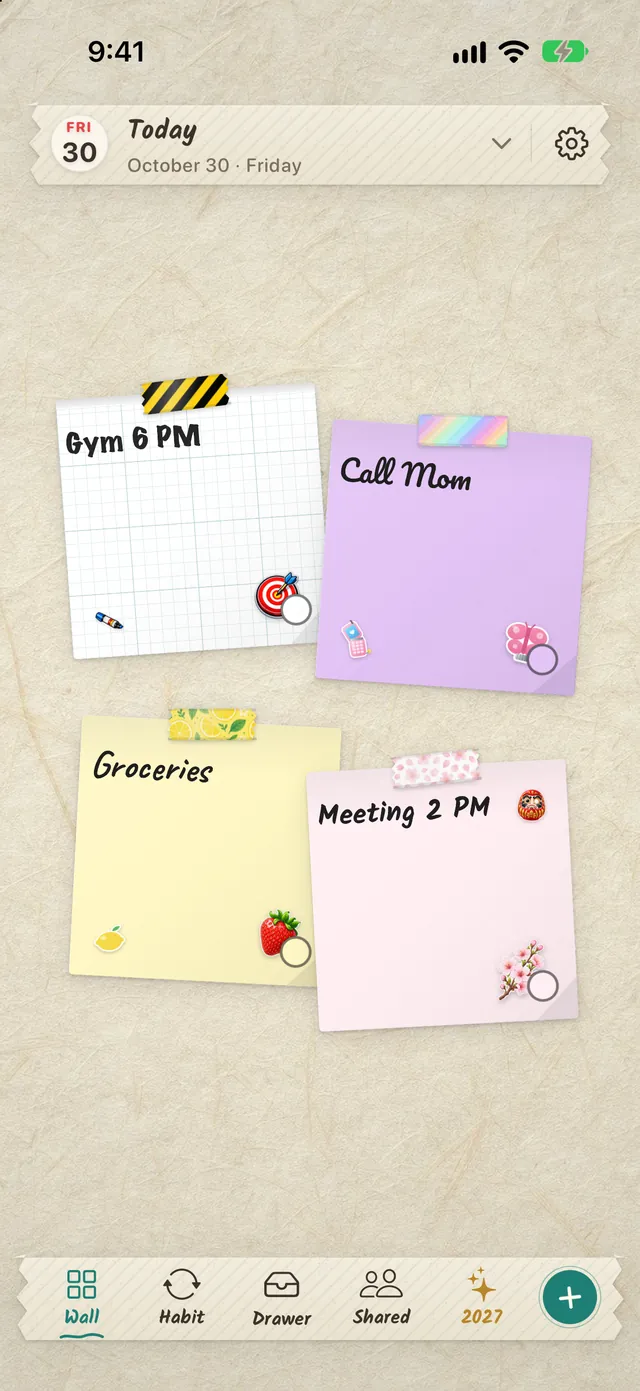
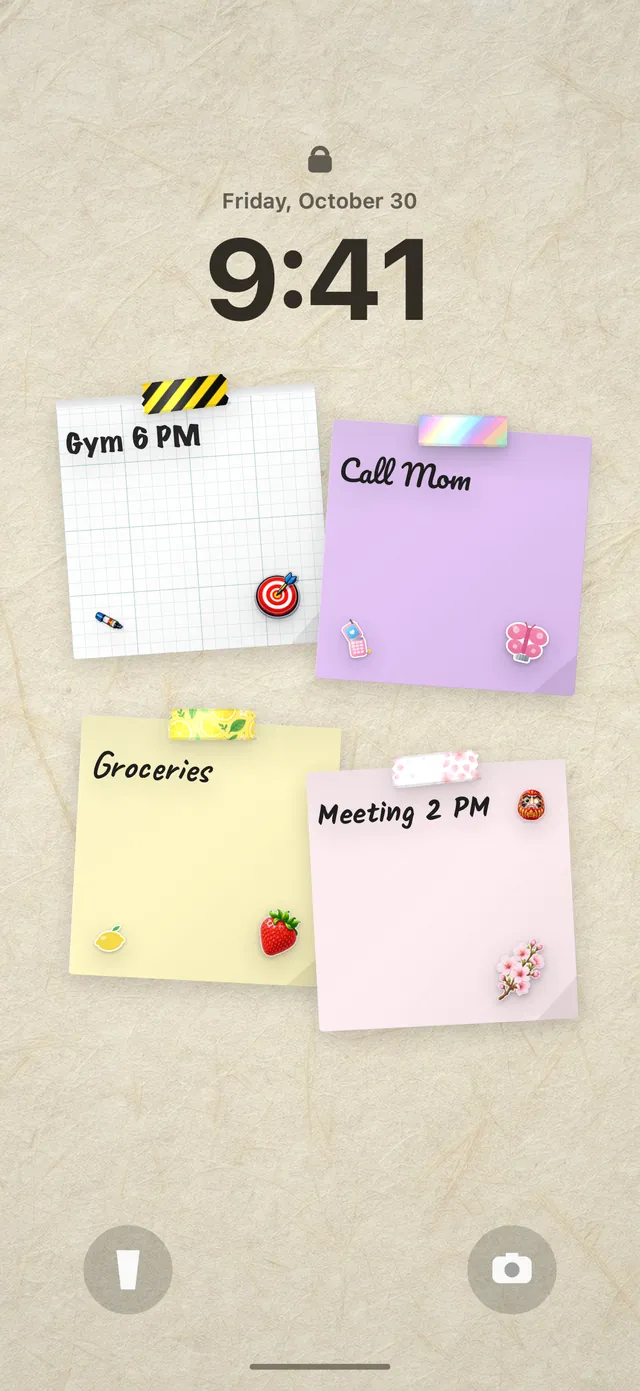
DailyWall started as a sticky-notes wall for iPhone and iPad: every day has its own wall of paper notes, and that wall becomes your Lock Screen wallpaper through a Shortcuts automation you set up once. Habits build on the same idea. Each habit is a paper that hangs itself on your wall on the days you choose, so it’s on your Lock Screen every time you pick up your phone, without opening the app.
There are 44 ready-made habits in eight categories (Health, Movement, Mind, Learning, Productivity, Home & life, Relationships and Money), and each asks its own questions: a water habit asks how many glasses, a reading habit asks pages or minutes. Or you create your own. You choose the days (every day, weekdays, weekends, chosen days or a number of times a week), an optional reminder and an optional end date for challenges. Tap + on the paper to fill a progress dot, like 3 of 8 glasses.
The big difference is how it handles a missed day. There’s no penalty: that day’s paper simply stays faded on its own day and tomorrow starts fresh. You still see gentle statistics, such as how many times you did it this week and your longest run of days, but nothing turns red.
Tick the steps as you go
Streaks: for people who love an unbroken chain
Streaks is an iPhone and Apple Watch app built entirely around the “don’t break the chain” idea. You choose a small set of habits, each shown as a round icon, and tap to complete them. It can complete some habits automatically from Apple Health data, such as steps or workouts, and it supports habits you want to do and ones you want to avoid.
It has a clean, very Apple-like design and works well with widgets and the Watch. The flip side is in the name: the motivation comes from your streak count, which suits people who find a long chain exciting and can be discouraging for people who don’t.
Habitify: for detailed stats on any device
Habitify is a cross-platform habit tracker available on iPhone, Android, Mac and the web, which makes it a good fit if you switch between devices. It organises habits by time of day, supports counts and durations as well as yes/no habits, and puts a lot of weight on statistics: completion rates, trends and progress over weeks and months.
It suits people who like to analyse their habits and see numbers improve. If you just want a reminder to drink water, its depth may be more than you need.
Habitica and Finch: gamified habit trackers
If plain checklists bore you, a game can help. Habitica turns your habits, daily tasks and to-dos into a role-playing game: you create a character, earn experience and gold for doing your habits, lose health for skipping them, and can join a party with friends to take on quests together. It’s been around for years and has a large community.
Finch takes a softer approach. You look after a small pet bird that grows and goes on adventures as you complete self-care goals and check in on your mood. It’s aimed more at wellbeing and gentle routines than at productivity.
Both work best for people who are motivated by play. If you find games distracting, a simpler tracker will probably serve you better.
Other habit tracker apps worth knowing
Tick the steps as you go
Free habit tracker apps: what you actually get
Searching for a free habit tracker app usually turns up apps that are free to download with a paid upgrade. That’s fine, as long as you know where the limit is. The most common limits are the number of habits, access to statistics and history, and sync across devices.
A useful rule: start with the free tier and only one or two habits. If you’re still logging after three weeks, the app suits you and an upgrade might be worth it. If you stopped after a week, a paid plan wouldn’t have changed that. Apple Reminders is entirely free for simple daily reminders, and DailyWall’s free version includes one habit plus five notes a day, which is enough to test whether seeing a habit on your Lock Screen helps you.
How to stick with any habit tracker
Whichever app you pick, the same few things decide whether you’re still using it next month:
Tick the steps as you go
Set up your first habit in DailyWall
If the Lock Screen approach sounds right for you, here’s how to try it with the free habit:
Tick the steps as you go
Questions people ask
What is the best habit tracker app for iPhone?
It depends on what motivates you. Streaks suits streak lovers, Habitify suits stats fans, Habitica and Finch suit people who like games, HabitShare suits accountability, and DailyWall suits people who want habits on their Lock Screen with no streak penalty.
Is there a completely free habit tracker app?
Apple Reminders is free and can repeat daily reminders, though without streaks or stats. Most dedicated habit trackers, including DailyWall, have a free tier with a limited number of habits and an optional paid upgrade.
Can I see my habit tracker on my iPhone Lock Screen?
Several apps offer small Lock Screen widgets. DailyWall goes further: your wall of notes, including habit papers with progress dots, becomes the Lock Screen wallpaper and updates automatically.
Is Loop Habit Tracker available on iPhone?
No. Loop Habit Tracker is an Android app. On iPhone, Way of Life and Streaks are close in spirit if you like a simple tracker.
Do streaks help you build habits?
They motivate some people, especially early on. Others give up the first time a long streak resets. If that sounds like you, choose an app that shows weekly progress instead of punishing missed days.
How many habits should I track at once?
Start with one or two. Add another only when the first feels automatic, which for simple habits often takes a few weeks or more.